
JCheckBox
The JCheckBox class allows the entry of values which are true or false by enabling the user to click a small rectangular box resulting in a "tick" mark being displayed within:
JCheckBox wantFries = new JCheckBox("Do you want fries with that?");
panel.add(wantFries);
The screen will look like this:
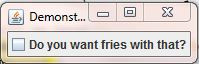
JCheckBox
Each time the user clicks inside the check box it will alternate between being ticked and un-ticked. If you want to make the box ticked in your program, you can use the setSelected() method:
wantFries.setSelected(true);
- The method argument requires a
booleanto specify whether the box should be checked
To see whether or not the check box is checked you can use the isSelected() method which returns a boolean:
boolean b = wantFries.isSelected();
// b will either be true or false

Comments