
JOptionPane
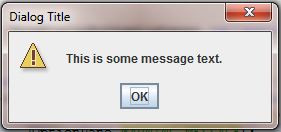
The JOptionPane class provides a simple way of displaying standard dialogs that show informational, warning or error messages through its static convenience methods. Change the ShowDialogButtonListener inner class as follows:
private class ShowDialogButtonListener implements ActionListener {

    @Override
    public void actionPerformed(ActionEvent e) {
        JOptionPane.showMessageDialog(DemoUI.this,
                    "This is some message text.", "Dialog Title",
                    JOptionPane.INFORMATION_MESSAGE);
    }

}
The method showMessageDialog() is static and hence can be invoked directly on its class JOptionPane;
Four arguments are passed to the method:
- The first argument is the owning frame. Note how because this is being used from within the inner class
ShowDialogButtonListeneryou need to prefix this with the name of the outer class in order to refer to the frame instance - The second argument is the text that will appear in the dialog
- The third argument is the text of the dialog's title
- The fourth argument indicates that the message is informational. This is used so that an appropriate icon is displayed inside the dialog
You can click OK to close the dialog.
You should see the following after clicking the Show dialog button:

If you change the fourth argument to JOptionPane.WARNING_MESSAGE the icon will appear as follows:
Setting it instead to JOptionPane.ERROR_MESSAGE will give this icon:

If you don't want an icon then specify JOptionPane.PLAIN_MESSAGE.
Often, it is useful to ask the user a Yes/No question, and for this you can use another static method called showConfirmDialog(). Change the code inside the button listener to the following:
private class ShowDialogButtonListener implements ActionListener {

    @Override
    public void actionPerformed(ActionEvent e) {
        int response = JOptionPane.showConfirmDialog(DemoUI.this,
                "Do you want to exit the program?", "End Program",
                JOptionPane.YES_NO_OPTION);
        if (response == JOptionPane.YES_OPTION) {
            System.exit(0);
        }
    }

}
- The first three arguments are the owning frame, the message text and the dialog title, as before
- The fourth argument specifies that the user should be given the options Yes or No
- The
showConfirmDialog()method returns anintwhen the user chooses either yes or no (or closes the dialog). Above, the returned value is stored in variableresponse - The
responsevariable is checked to see if the Yes option was selected, and if so then the program is ended by callingSystem.exit(0). Otherwise the dialog is closed and returns to the frame
The dialog looks like this:

In the section on JDialog a simple entry box with a label, text field and button were constructed. For simple inputs like this there is another convenience method of JOptionPane called showInputDialog():
String response = JOptionPane.showInputDialog(DemoUI.this,
                            "Your name", "Name Entry",
                            JOptionPane.QUESTION_MESSAGE);
- The method returns a
String. The dialog will look as follows:

In the next series of lessons we will look at access modifiers and visibility.

Comments