
Access modifiers and visibility
Access modifiers enable you to protect and control parts of your application from inappropriate use by other parts or other applications. A singleton class is one where no more than one instance of that class can exist.
In this section you will learn:
- An overview of access modifiers
- Using protected visibility
- Using "default" visibility
- How to define a "singleton" class
Overview of access modifiers
So far in this course you have made use of two different access modifiers, public and private.
When applied to class members (i.e., variables and methods) these modifiers allow different levels of access, summarised as follows:
public: as well as being accessible inside the class in which it is defined, the member will also be accessible to any other class in any part of the application. If the class that wants to use the public member is in a different package, then it merely needs to import the package that contains the public memberprivate: the member is only available inside the class in which it is defined
In this course you have developed the core system classes in a package called virtualzoo.core and the user interface classes in a separate package called virtualzoo.ui. You have also defined the access modifiers as follows:
- All instance variables as
private - All constructors as
public - Most methods as
public, except for a fewprivate"helper" methods
While the above approach provides a straightforward starting point it does have the disadvantage of being "all or nothing": if a class member is public then the whole application has access to it while if it's private then no other class does. As your application develops it is useful to be able to assign more fine-grained control over member visibility, and Java provides two further levels of visibility modifiers that sit between these two extremes:
- Default (or "package") visibility – only other classes within the same package can access these members
- Protected visibility – only other classes within the same package, or subclasses in a different package, can access these members
- The following table summarises all four access modifying options, ordered from the most restrictive to the least restrictive
| Access option | Keyword | Description |
| Private visibility | private | Only the class that declares the member can access the member |
| Default (package) visibility | (none) | Only the class that declares it, and any other class in the same package, can access the member |
| Protected visibility | protected | Only the class that declares it, any other class in the same package, and any subclass in a different package, can access the member |
| Public visibility | public | Any class in any package can access the member |
You will notice that for default visibility there is no associated keyword. It is therefore the absence of an access modifier keyword that indicates that level of visibility, which is why it is referred to as default visibility. From now on this course will refer to default visibility as package visibility since this makes it easier to remember that only classes in the same package can ever access it.
A good rule-of-thumb is to make your classes, constructors, and members as private as reasonably possible.
Using 'protected' visibility
Protected visibility is often used so that a superclass can give subclasses access to its members that are not intended for public use, given that subclasses are often defined in a different package to the superclass from which it inherits. You may recall that the Animal class defines a setAge() method which invokes a validateAge() method, and these are currently defined as follows:
public void setAge(int age) {
    validateAge(age);
    this.age = age;
}

private void validateAge(int age) {
    // Ensure new age is between 0 and 50
    if ((age < 0) || (age > 50)) {
        throw new IllegalArgumentException("Age must be 0 - 50");
    }
}
The validateAge() method is declared as private, which means it is not available to be overridden by any subclass[1]. It is easy to envisage that different species will have different expected age ranges, so it would make sense for validateAge() to be overridable, but if you were to make the method public it would allow any client object to invoke the method when its purpose is merely internal to Animal and its subclasses.
Change the access modifier of validateAge() from private to protected:
protected void validateAge(int age) {
    // Ensure new age is between 0 and 50
    if ((age < 0) || (age > 50)) {
        throw new IllegalArgumentException("Age must be 0 - 50");
    }
}
In class Lion you can now override this method to specify a different age range to validate against:
@Override
protected void validateAge(int age) {
    // Ensure new age is between 0 and 20
    if ((age < 0) || (age > 20)) {
        throw new IllegalArgumentException("Age must be 0 - 20");
    }
}
Using package (i.e., default) visibility
You will shortly modify some of the classes so far developed to make use of package visibility instead of public visibility, for certain constructors and methods. Before that, however, you need to understand what is trying to be achieved and the reasons for doing so.
You have developed two main packages, virtualzoo.core to hold the classes which form the business domain (i.e., the core system) and virtualzoo.ui to hold the classes which form the graphical user interface. These have been separated because it is advantageous to allow each to be developed and modified in the future without the changes impacting upon the other:
- Suppose in the future you want to change the user interface (or develop an alternative user interface) that operates from a web page or from a smartphone app. Ideally it should be possible to do this without necessitating any changes to the core system
- Conversely, suppose in the future you decide to change the core system, perhaps to restructure the existing classes or create new ones. Ideally it should be possible to do this without necessitating any changes to the user interface
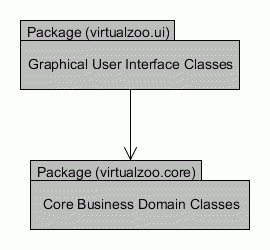
The above package diagram illustrates the user interface package depending upon the core system package but not vice versa, as indicated by the arrow pointing in one direction only. This is commonly known as a client-server (or 2-tier) architecture, where the user interface is the client, and the core system is the server.
The next question is how should the user interface depend upon the core system? To answer this, think for a moment about the desktop interface of your operating system, whether that be Windows, Macintosh, Linux, or something else. Behind the scenes, inside the operating system there is much complexity regarding such things as how files and folders are physically stored and retrieved, how the devices communicate with each other, etc. And yet all this complexity is hidden behind a single desktop containing application icons, from which you can achieve any action the operating system allows. When you drag a file to move it from one folder to another, or click an icon to print a document, you don't need to worry about how the internal parts of the computer's software and hardware accomplish those tasks. The operating system, through its desktop interface, enables you to simply make the request and it takes care of the internals for you.
You can think of the desktop as being like a secretary or administrator on a front desk, responsible for taking all incoming requests to perform actions or supply certain results. Applying the same principle to the zoo application because the user interface needs to make requests of the core system then it is the core system that can benefit from its own "front desk" to serve as the middleman between the two packages.

The above diagram shows an object in the User Interface package (which could be the frame, a dialog, or any of the UI panels that make up the user interface) communicating only with an "administrator" object in the Core System package. The "administrator" object in turn communicates with various other objects that comprise the core system, potentially in complex ways[1]. If the "administrator" object did not exist then the user interface would need to know about the structure of the core system classes and communicate with them directly, which would make it harder to modify either of the packages without it impacting upon the other package.
In the zoo application being developed in the course, the ZooAdministrator class, which is part of the core system package, will take on the role as the "administrator" object. Whenever an object from the user interface package needs the core system to perform an action or provide some data then it will communicate with the core system by invoking a method of a ZooAdministrator object. For example, in the next section you will develop a graphical class that enables you to enter details of a new zookeeper, so this requires the ZooAdministrator class to provide a method called createZooKeeper(), taking as arguments the values entered on the screen. This method will then manage the process of creating a ZooKeeper object on behalf of the core system.
This approach of having a ZooAdministrator class to coordinate the facilities of the core package is an example application of the Facade design pattern. Design patterns provide generic approaches to software design problems.
The ZooAdministrator object will also store the data associated with the zoo (in Collection objects); all of the animals, zookeepers and visitors, and will provide a facility to store this data permanently on disk[1]. Because there should only be one set of data to model the objects in the zoo it would make sense to only ever create one ZooAdministrator object (known as a singleton), which all of the the user interface objects will communicate with. You will now start to modify the ZooAdministrator class to make it suitable for the purpose just discussed.

Comments