
JComboBox
The JComboBox class allows the user to select an item using a drop-down list:
JComboBox colourCombo = new JComboBox();
colourCombo.addItem("Red");
colourCombo.addItem("Green");
colourCombo.addItem("Blue");
panel.add(colourCombo);
It looks like this:
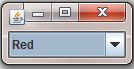
JComboBox
If you click on the small down-pointing arrow to the right of the option, then the other options will appear:

JComboBox options
You can select the item required either with the mouse or the keyboard. If there are lots of items, then a vertical scrollbar will automatically appear. To obtain which item was selected you can either use getSelectedItem() which returns an Object, or getSelectedIndex() which returns an int, being the position in the list of the selected item (where zero is the first item, etc.):
String selectedColour = (String) colourCombo.getSelectedItem();
int selectedIndex = colourCombo.getSelectedIndex();
- Note that you need to cast the
Objectreturned fromgetSelectedItem()back into aString, since it wasStringobjects which you added to the component.

Comments